
Connect your systems
Accounting, payroll, tickets, backups and more, with each connection showing when it last synced and whether it's healthy.

The information you need, for the people who need it, at the right time and in the right context.
Which quotes need a follow-up? Which jobs are waiting on missing information? What needs my attention today?
Answering questions like these means moving between sales records, spreadsheets, inboxes and the systems you run on. It takes someone's time, and by the time it's done, it's out of date.
Meanwhile, money slips through the gaps between those systems: a customer nobody remembered to bill, a regular bill that quietly doubles, a fee that shows up every month and nobody questions.
Every one of these runs in ThinkHQ, our own HQ, today. Yours starts with the one that matters most to you.
Accounting, payroll, tickets, backups and more, with each connection showing when it last synced and whether it's healthy.
One screen that flags what's urgent and which customers are unhappy, so nobody digs through five systems to find out.
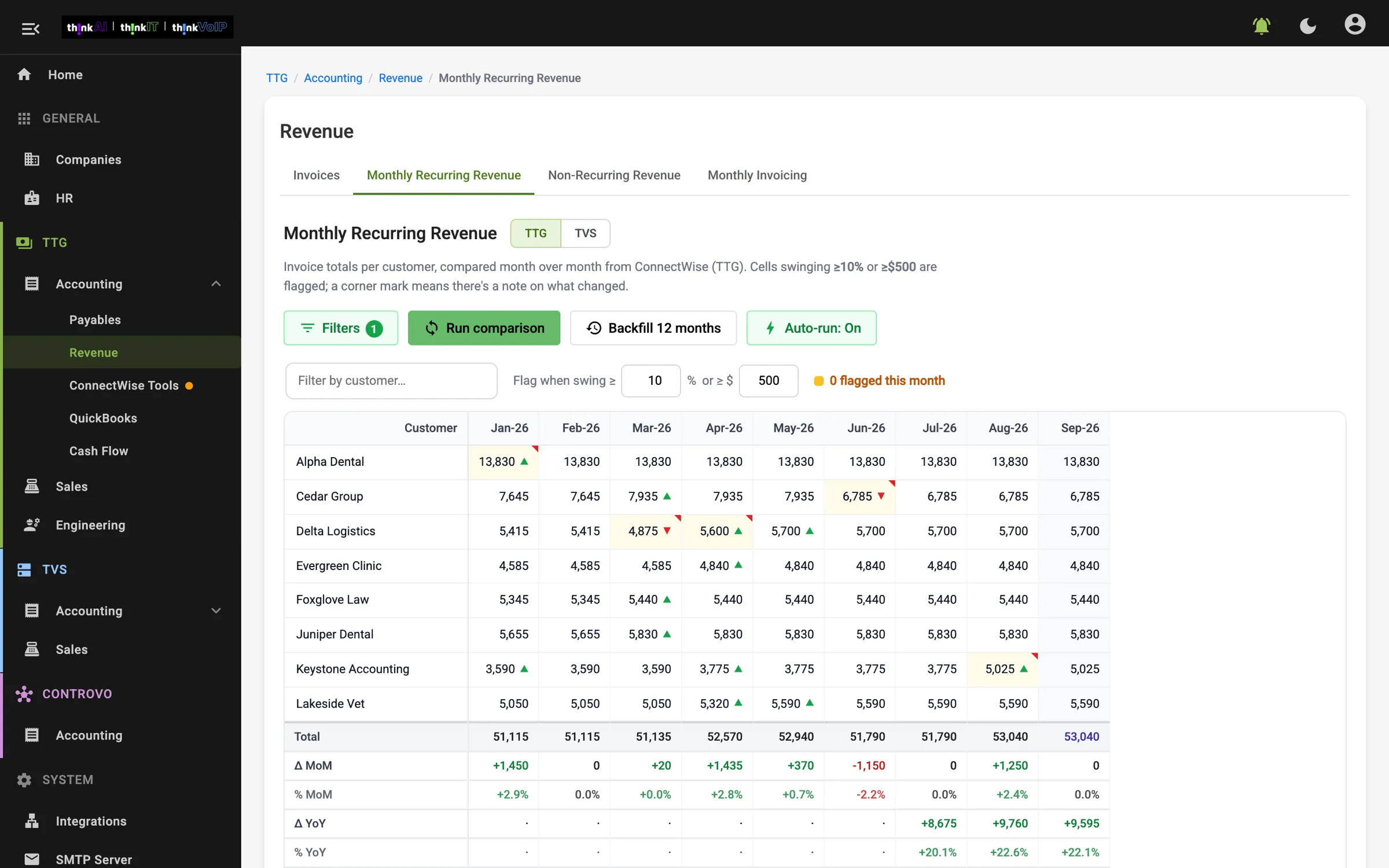
Recurring billing lined up by customer and month, with anything that dropped, jumped or didn't go out flagged. Click a number to see the invoices behind it.
Find bills that keep coming but nobody planned for, and flag a regular bill that suddenly jumps before someone just pays it.
Drop in a signed quote. It reads it, matches it to the customer and flags anyone being billed without a contract.
When a tool almost does what you need, we add the missing piece instead of replacing the tool.
Break a long vendor bill into parts, check that every line adds up and compare it month to month.
Turn your data into the exact numbers a regulatory report asks for, and flag anything that looks off.
Your existing systems stay the record. Open any item to see where it came from.
Each view shows when its information last updated, and a broken connection is flagged instead of looking like nothing to do.
Each person sees what matters for their role, plus a shared team view, and only what they have permission to see.
Every number has a written definition and a source, so meetings are about decisions instead of whose spreadsheet is right.
We start with what you need to know, who needs it and when it makes a difference.
QuestionsWe choose one recurring workflow, one owner and one or two systems to connect. If one can't connect, you'll know before we build.
First viewWe build the first view and test it against real examples before anyone relies on it.
TestedOnce the first view earns its place in your week, we add views for sales, service, cash or operations.
Next viewsBefore we offered this to anyone, we built one for ourselves. Our team uses ThinkHQ every day for contracts, invoices, payables, revenue and cash flow across two companies. It has caught billing we'd missed, equipment that never made it onto an invoice and fees on a vendor bill that nobody had noticed. One of those catches paid for the work on its own. Business HQ is the same idea, built around your business.
Fix one task that eats your team's week. We build it, test it on your real cases and keep it running.
Find out where AI is worth the money: what to automate, what to change and what to leave alone. You keep the roadmap either way.
Tell us what you need to know, and who needs to know it. We'll tell you whether Business HQ is the right fit and what the first view would be. ThinkAI leads every build.